"Print Actual Size Inches: Free Online Ruler for Accurate Measurements"
Printable Online Ruler in Actual Inches: A Comprehensive Guide
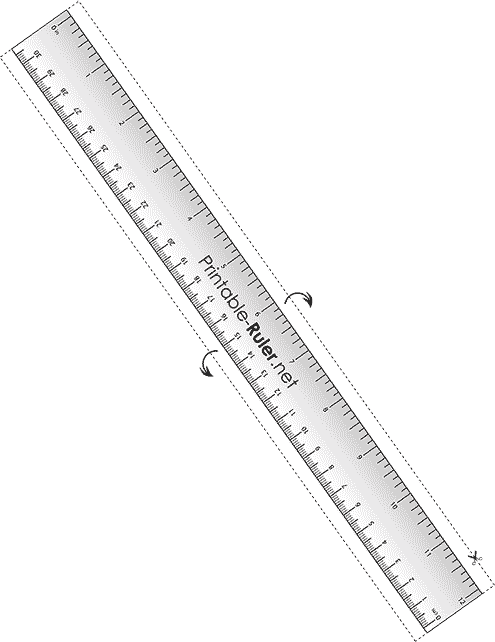
In the digital age, the need for physical measuring tools like rulers has significantly decreased. However, there are still instances where you might require a ruler, such as for drawing, crafting, or measuring small objects. This is where printable rulers come in handy. But how do you ensure you're getting an accurate measurement? The answer lies in using an online ruler that prints in actual inches.
Understanding Printable Ruler Sizes
Before delving into how to print an online ruler in actual inches, it's crucial to understand the different sizes of printable rulers. Rulers are typically measured in inches or centimeters. However, when you print a ruler from your computer, the size can vary depending on your printer's settings and the ruler's digital size.
Actual Size vs. Scale
When you print a ruler, you have two primary options: actual size and scale. Printing at actual size means the ruler will print at the exact size it appears on your screen. On the other hand, printing at scale means the ruler will print at a specific percentage of its actual size.


Printing an Online Ruler in Actual Inches
To print an online ruler in actual inches, you'll need to ensure that your printer is set to print at 100% scale or actual size. Here's a step-by-step guide to help you achieve this:
-
Find an online ruler that suits your needs. There are numerous websites offering free printable rulers in various sizes and designs.
-
Once you've found your ruler, click on the 'Print' button. This will usually open a new window or tab with a print preview.
-
Check your printer's settings. The exact process for this will depend on your printer and operating system. In general, you should look for a 'Scale' or 'Size' option, usually found under 'Page Handling' or 'Layout'.
-
Ensure that the scale or size is set to 100%. This will ensure that the ruler prints in actual inches, not a scaled-down version.
-
Check your paper size. Ensure that the paper size you've selected matches the size of the ruler you're printing. For example, if you're printing a 12-inch ruler, select 'Letter' or 'A4' paper size.
-
Click 'Print'. Your ruler should now print in actual inches, providing you with an accurate measuring tool.
Troubleshooting Common Issues
Even with the correct settings, you might still encounter issues when printing an online ruler in actual inches. Here are a few common problems and their solutions:


| Problem | Solution |
|---|---|
| Ruler prints too small or too large | Check your printer's settings again. Ensure that the scale or size is set to 100%. Also, ensure that you've selected the correct paper size. |
| Ruler doesn't print correctly | Try a different printer or a different type of paper. Also, ensure that your printer's ink or toner levels are sufficient. |
| Ruler prints with incorrect measurements | Ensure that the online ruler you're using is accurate. Some websites may not provide rulers with accurate measurements. |
Alternatives to Printable Rulers
While printable rulers are convenient, they're not always the best solution. Here are a few alternatives to consider:
-
Digital Rulers: There are numerous digital ruler apps available for both smartphones and computers. These provide an accurate measurement tool without the need for printing.
-
Physical Rulers: If you find that you're frequently needing to measure things, it might be worth investing in a physical ruler. These are inexpensive and provide a reliable measurement tool.
-
Tape Measures: For larger measurements, a tape measure is often more convenient than a ruler. These are also inexpensive and widely available.
In conclusion, printing an online ruler in actual inches can provide a convenient and accurate measurement tool. However, it's important to understand the different print settings and how to troubleshoot common issues. With the right knowledge and tools, you can ensure that your printable ruler provides accurate measurements every time.




Related Articles
"Actual Size Printable Ruler in Inches: Free Online"
Precisely Measure Online: Printable Ruler in Inches for Accurate Sizing In the digital age, the need for physical measuring tools hasn't diminished. Instead...
"Print Life-Size Ruler Online: Accurate & Free"
Printing Online Rulers to Actual Size: A Comprehensive Guide In the digital age, measuring tools have evolved from physical devices to online tools. Online...
"12-Inch Actual Size Online Printable Ruler: Free & Easy to Use"
Online Printable Ruler: 12 Inches Actual Size In the digital age, the need for physical measuring tools hasn't diminished. In fact, it's more convenient than...

"12-Inch Online Printable Ruler: Free & Easy to Use"
Effortless Measuring: The Online Printable 12-Inch Ruler In today's digital age, the need for physical tools like rulers hasn't diminished, but the way we...
"Instantly Download: Printable Actual Size PD Ruler for Online Use"
Printable Actual Size PD Ruler Online: A Comprehensive Guide In the digital age, the need for physical measuring tools hasn't diminished. While we have pixel...
"Actual Size Printable Ruler in MM: Free Download"
Precise Measuring with Printable Rulers in MM Actual Size In the world of design, crafting, and DIY projects, accurate measurement is paramount. A printable...